Image vscia product

VSCIA Vancouver Society for the Creation of Independent Art

Breaking down the design process with users and the business.

Contributions

  • User research
  • Interaction design
  • Visual design

Project Type

  • Non-for-profit project

Time

  • 4 months

Tools

  • Figma
  • Miro
  • Illustrator

Overview

Introduction

A semester-long school project that examines the role and value of UX and Interaction design Research, Ideation and Prototyping processes. We also focused on integrating user context into the design process through a range of design methods to build a user-centered design.

Focus Group

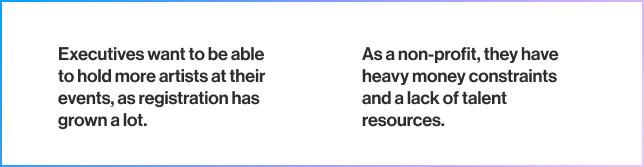
VSCIA (The Vancouver Society for the Creation of Independent Art) is a non-profit organization that aims to organize art events in the Greater Vancouver area, to promote local artists through events and other engagements. Every year VSCIA focus on organizing MiniComi: an all-ages, free-to-attend, single-day art market held in the Vancouver area.

Problem

Organizers do not prioritize communication and artist needs.

Artists lack mentorship support, guidance, and find it difficult to connect with other artists.

Solution

skip to solution

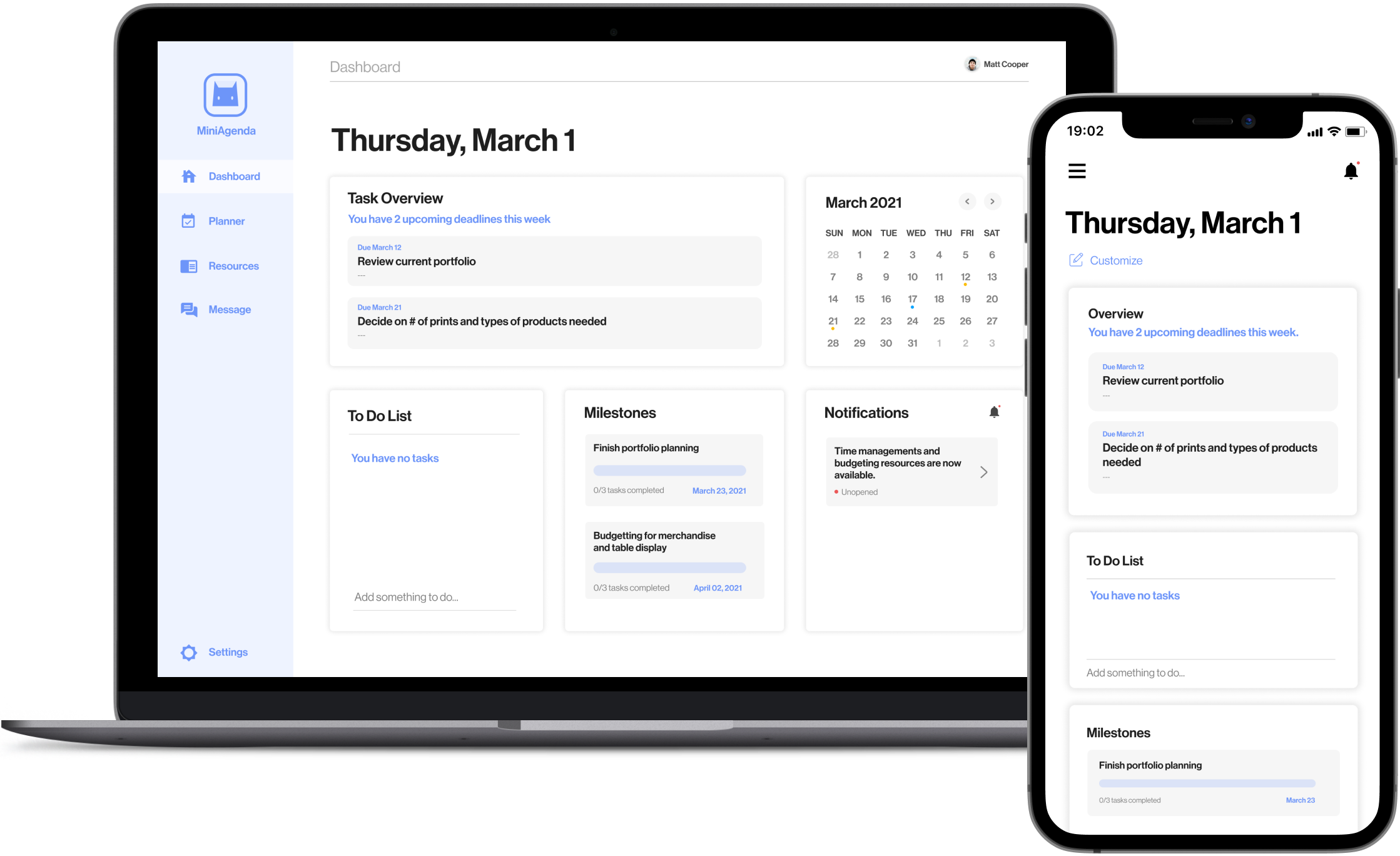
MiniAgenda is a web focused application to help guide artists through the planning and preparation process leading up to MiniComi, by providing recommended tasks, resources, and direct commmunication.
Research

Interview + Survey

The initial interviews we conducted asked general question for us to understand what artists do, their values, challenges, and goals. After seeing some common topics and problems that were brought up, we would then ask probing questions to understand those topics and problems areas better. Surveys were also used for artists who did not have time for interviews. We provided different questions depending on which avenues they have pursued for selling art.

Affinity Map

Key Observations

  • MiniComi organizers needs to focus on opportunities that are lower cost and scalable.
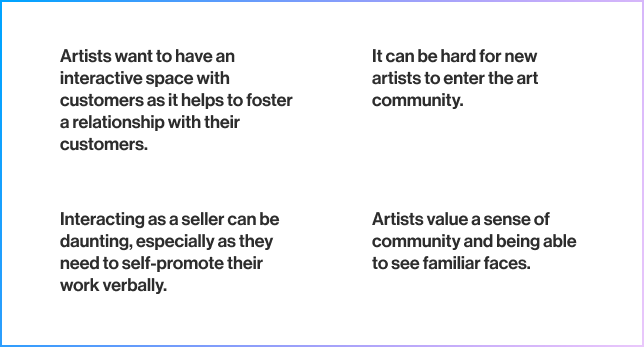
  • Artists want a free space to interact with customers and other artists without feeling restricted or excluded.
Image of first affinity diagram
Organizer research patterns
Image of second affinity diagram
Artist research patterns
View affinity maps

User Journey

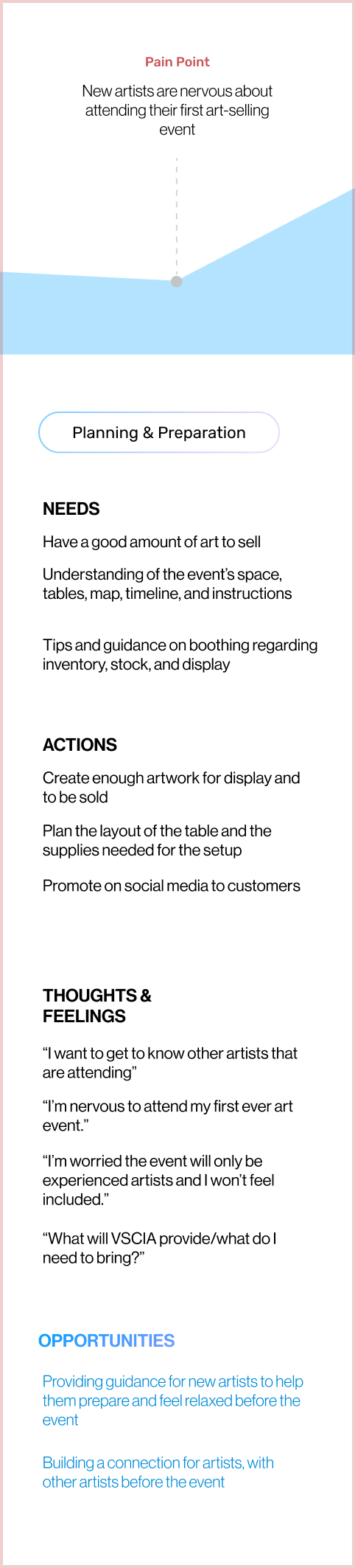
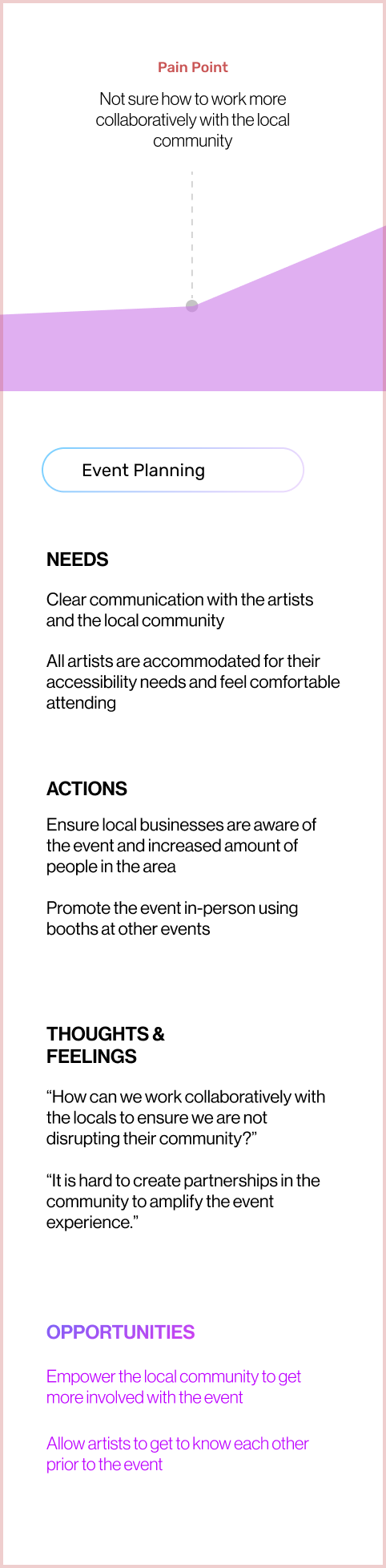
After creating our journey map for both artists and organizers, it was clear that there was opportunity to research more on the planning and preparation phase of attending conventions.

Image of pain point in artists user journey
Pain point in artist user journey
Image of pain point in organizers user journey
Pain point in organizer user journey
View user journey maps

Insights

Communication between artists themselves and with MiniComi organizers can be limited for amateur artists due to the lack of opportunities for networking with each other, lack of convention how-to's for first time sellers,and a difficulty for artists to express their needs to the organizers.

Problem statement:

How might we encourage open communication between these parties before the event and ensure new artists can get the support they need?

Opportunity Areas

How artists’ feel about their interactions with other artists prior to and during a convention

The planning and preparation experience for new convention sellers.

Communication between artists and organizers prior to the event.

Remote Participatory Workshop

We conducted 2 separate participatory workshops to learn how the artists and organizers see the research context and to ensure that our scope was relevant to their problem. The order of activity was important as each further revealed their opinions, thoughts and possible solutions.

Artist workshop

Activities and Goals

Graffiti Wall

Discover issues and hurdles they encounter during their event planning process

Ideal Scenario

Understand what an ideal event would entail for artists

Card Sort

Understand the convention priorities for artists

H-Forms

Seek solution areas that could be targeted by MiniComi

View artist participatory workshop
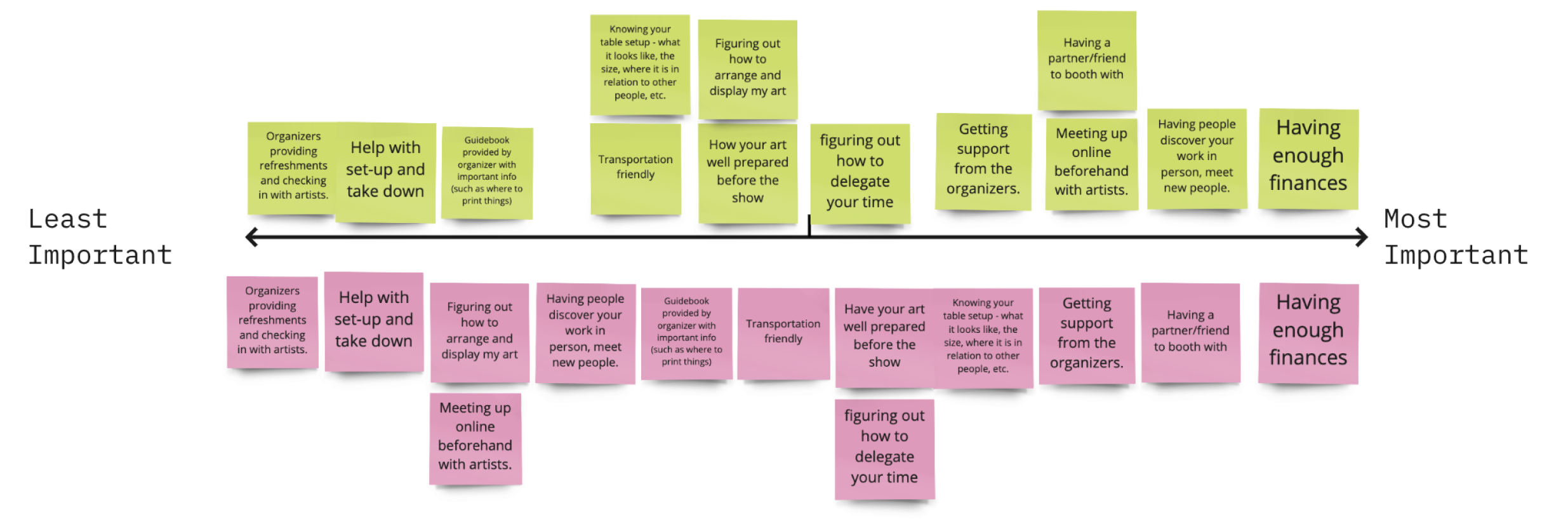
Image of artist Participatory Workshop Cart Sort
Activity#3: Cart Sort

Artist workshop: Card Sort

With some potential solutions in hand from the “Graffiti Wall” and “Ideal Event” activity, artists were now asked to sort them from least important to most important

This activity enabled us to understand what artists prioritize and which areas to focus on as designers.

Organizers Workshop

Activities and Goals

Graffiti Wall

Explore MiniComi’s interactions with artists during their event planning process

Investigate artists’ hurdles and issues in the MiniComi organizers’ context

Ideal Scenario

Unravel artists’ focus areas in the perspective of organizers

Identify potential solutions

Card Sort

Understand the feasibility of potential solutions

View organizer participatory workshop
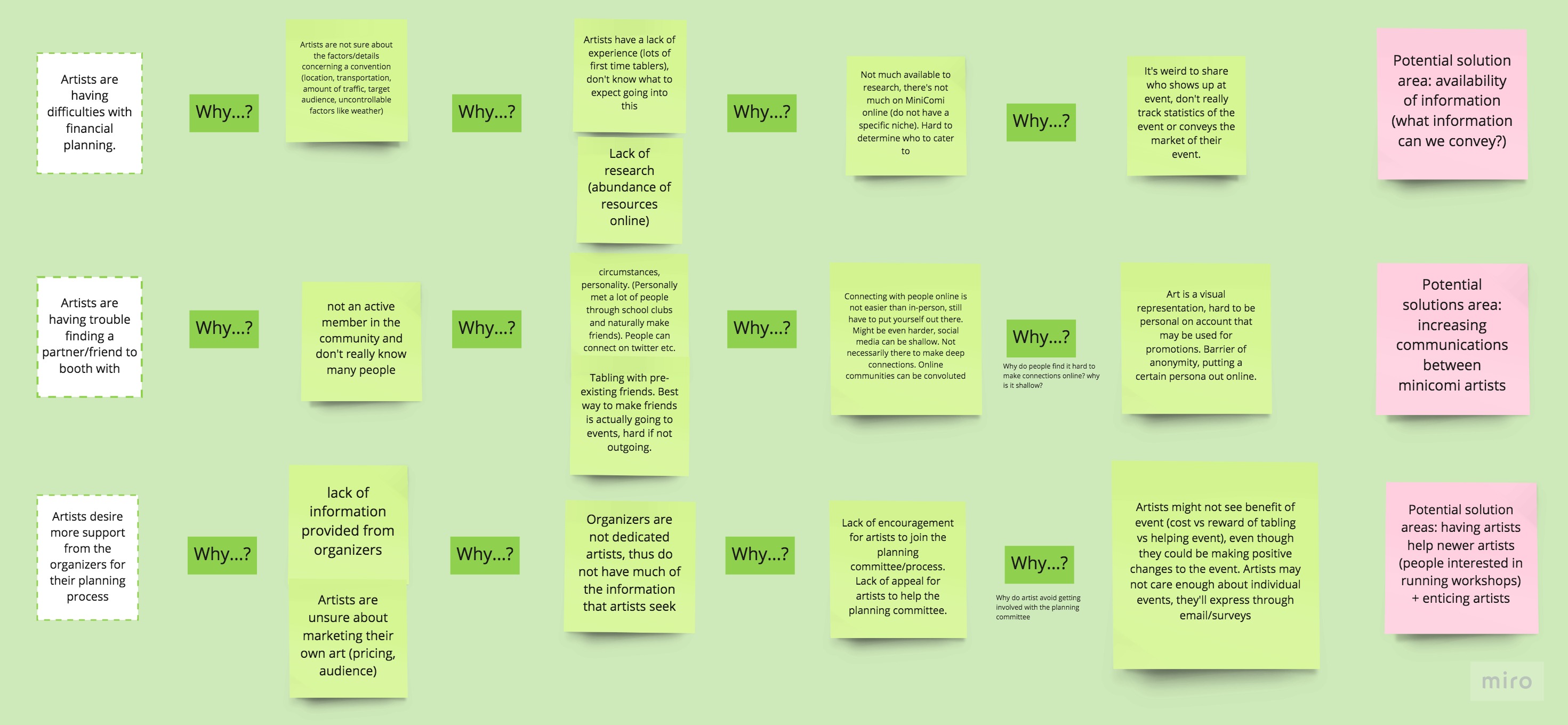
Image of organizers participatory workshop The Five Whys
Activity#2: The Five Whys

Organizer workshop: The Five Whys

Three problems from the artist workshop are listed. Organizers are asked to think of why it may be an issue and continue asking five times.

This activity enable organizers to understand why artists are experiencing certain fustrations and possible solutions that can mitigate artists difficulties.

Finalized Problem

#1 - MiniComi Organizers do not allocate time into communicating with artists and understanding their needs.

#2 - Artists lack mentorship support and guidance during planning and find it difficult to connect with other artists prior to conventions.

Design Space

How might we create a more genuine connection between organizers to better prepare for a more enjoyable MiniComi experience?

Solution

MiniAgenda is a web focused application to help guide artists through the planning and preparation process leading up to MiniComi, by providing recommended tasks, resources, and direct commmunication.
Solution Breakdown

Stakeholder Goals

Artist

Feel supported through the preparation stages of MiniComi and feel connected to fellow artists at the convention.

Organizers

Foster a collaborative relationship with the MiniComi artists and support them to ensure a positive convention experience.

Design Focus

01

Guide new artists through the convention planning phase with scheduled recommendations during each stage of art preparation.

02

Give MiniComi organizers the opportunity to build a relationship with artists and support them through all stages of MiniComi.

User Persona

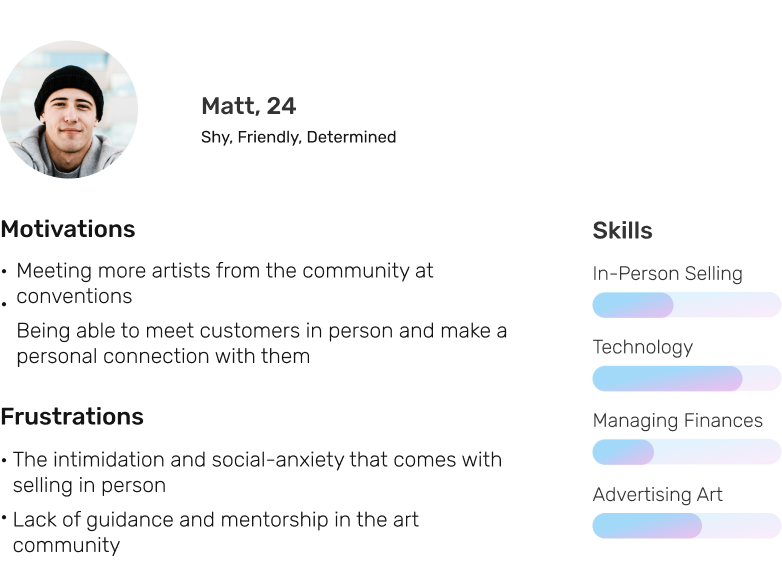
Matt is a busy full-time university student that recently began selling his own art work. He is unfamiliar with the art community and hopes to attend more art conventions that are inclusive to new artists.

User Persona of New Artist

User Flow

User on-boarding process and interactions

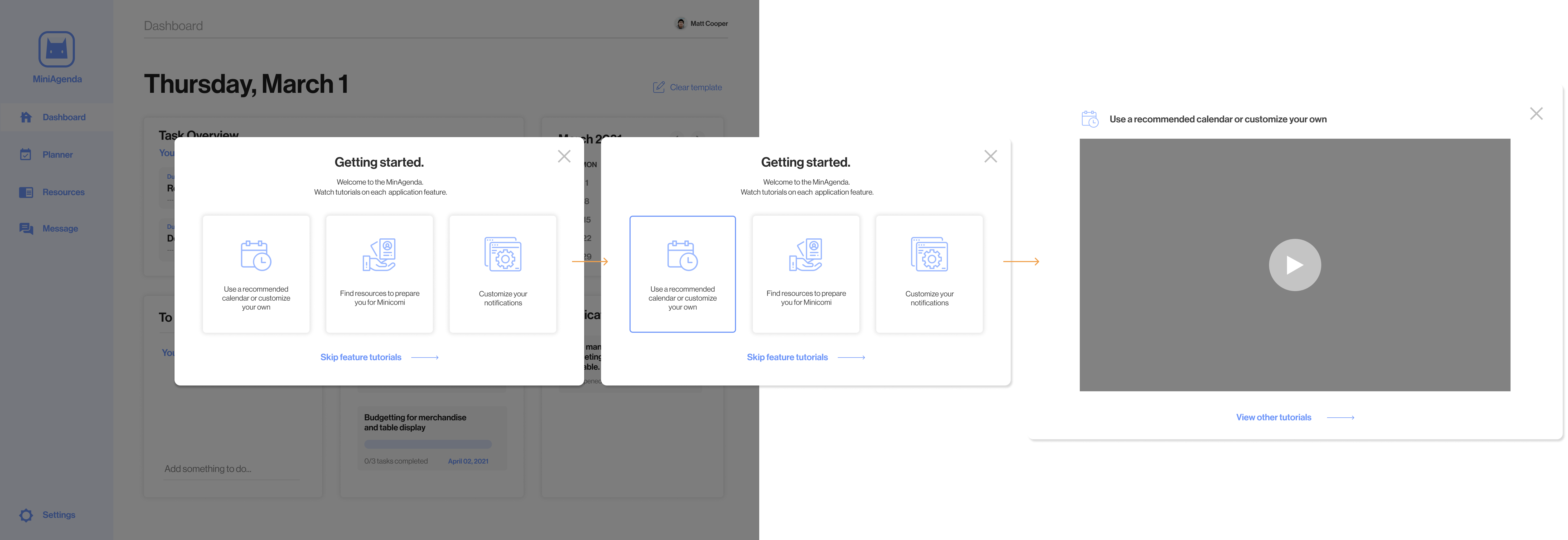
On-boarding

Once Matt has created an account, he is greeted with different video tutorials to understand the features offered on MiniAgenda.

Application home page interactions

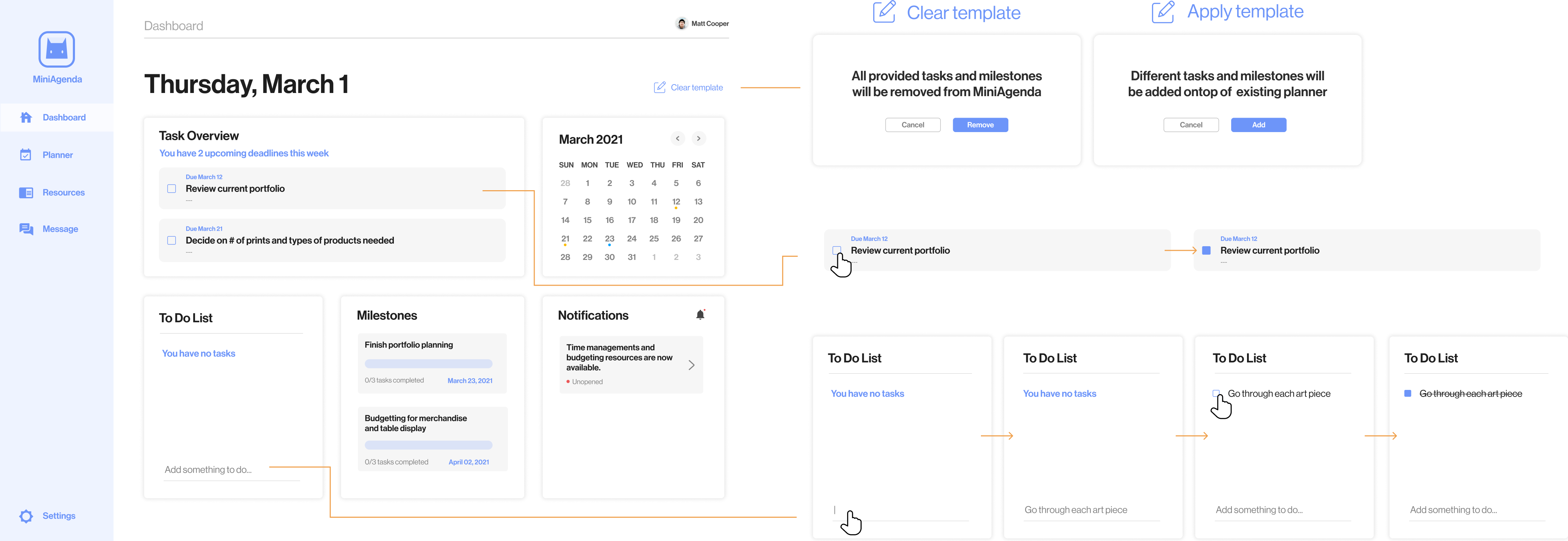
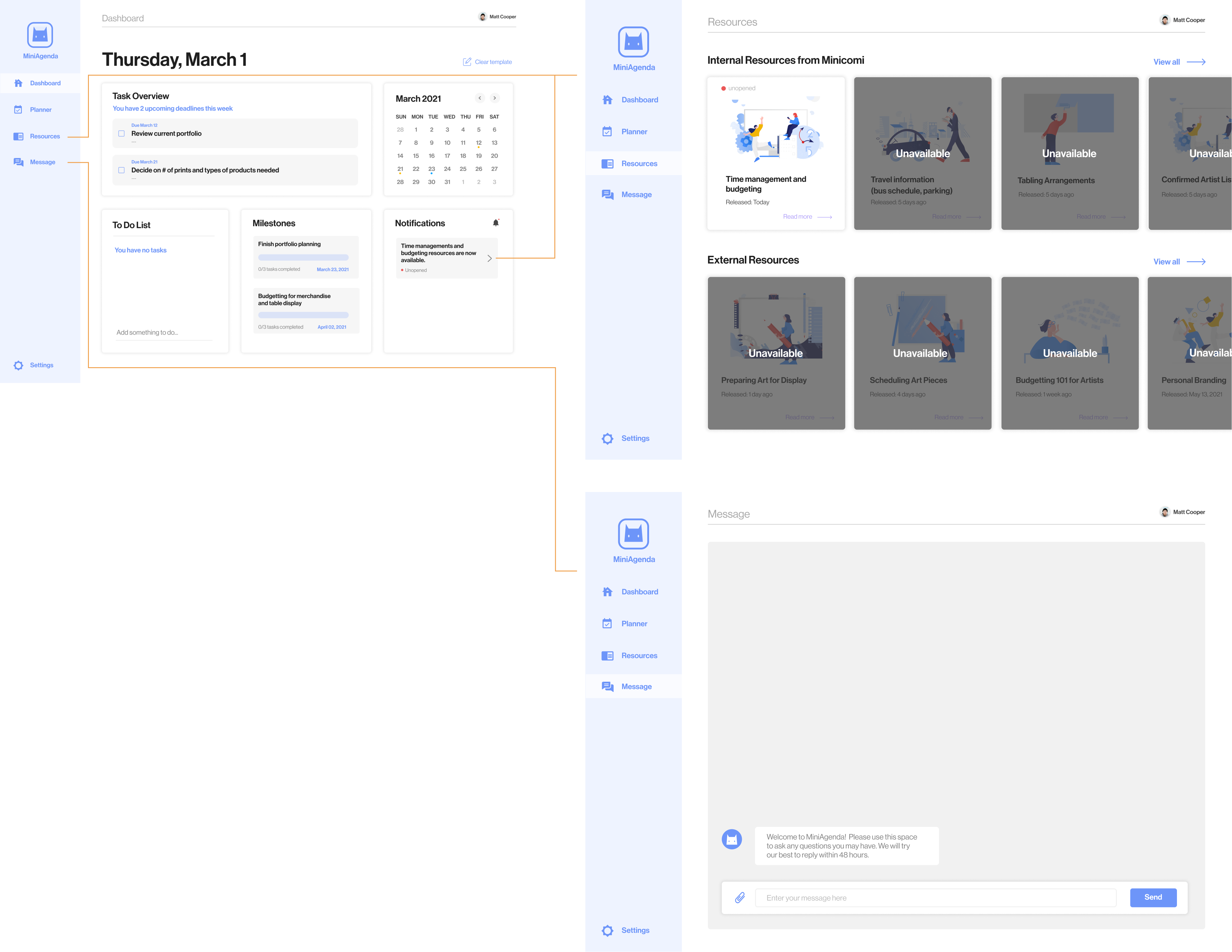
Dashboard

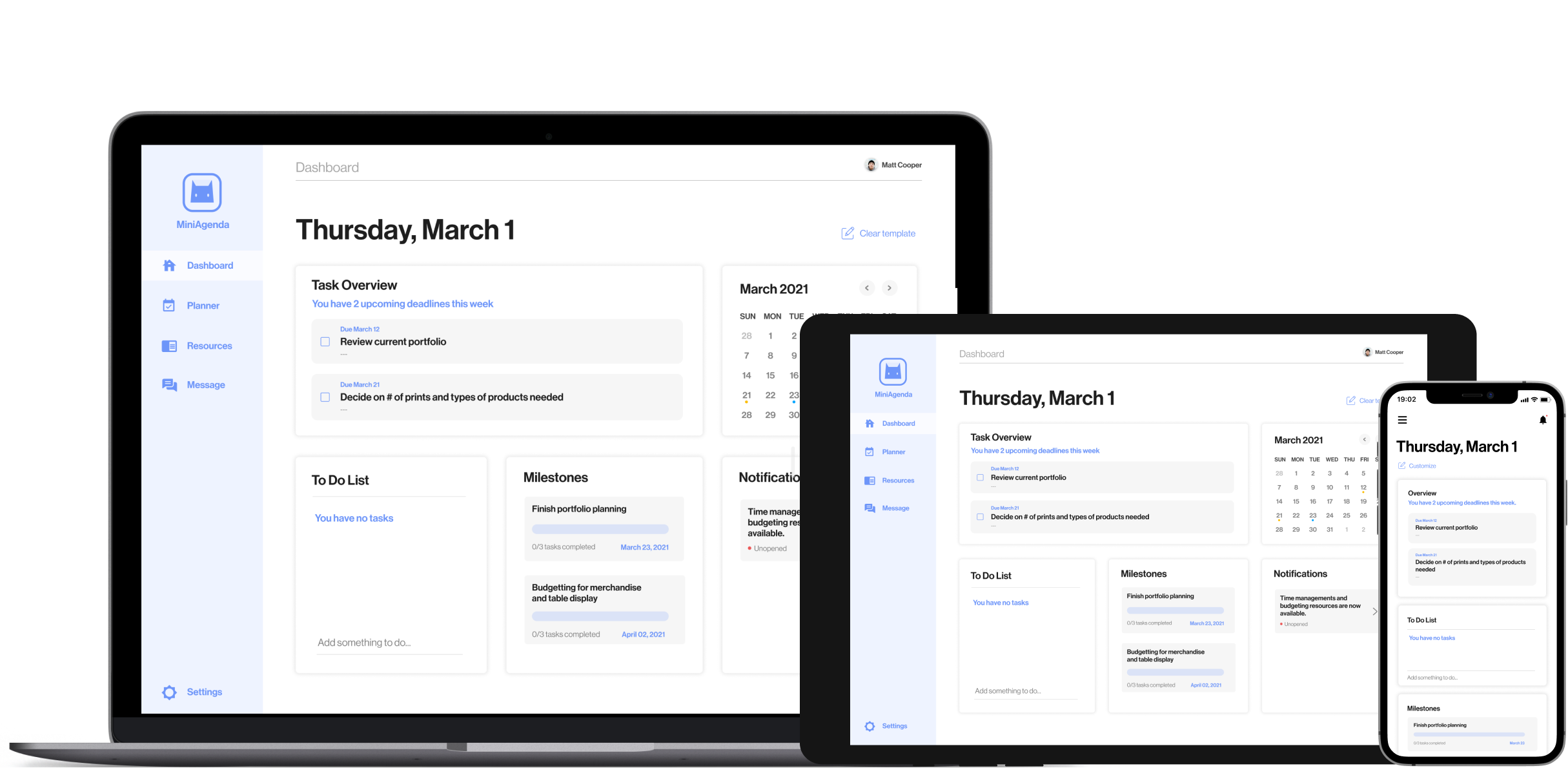
Matt is provided with a dashboard view of upcoming deadlines, to-dos, milestones, and resources. Recommended tasks and milestone are provided to ease new artist in preparing for Minicomi but can be cleared using the "Clear template" buttom if artists want to start from scratch.

Matt can also check off items in Task Overview or add notes to the To Do List.

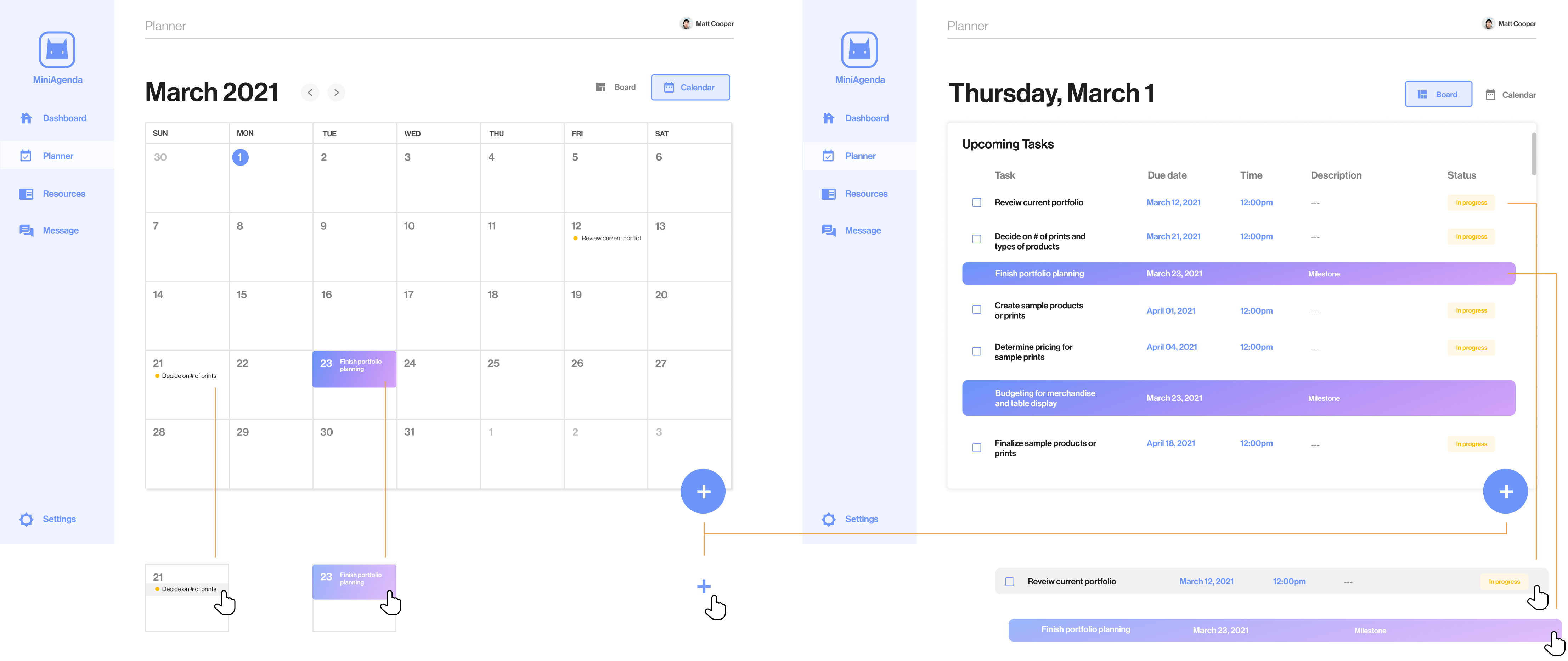
Planner page: Calender (left) and List (right) view

Planner Page

Matt can view tasks and milestones in details using two different views:

List and Calender

To add new tasks or milestones, Matt can click on the addition button on the bottom right. To make edits, Matt can directly click on existing tasks or milestones.

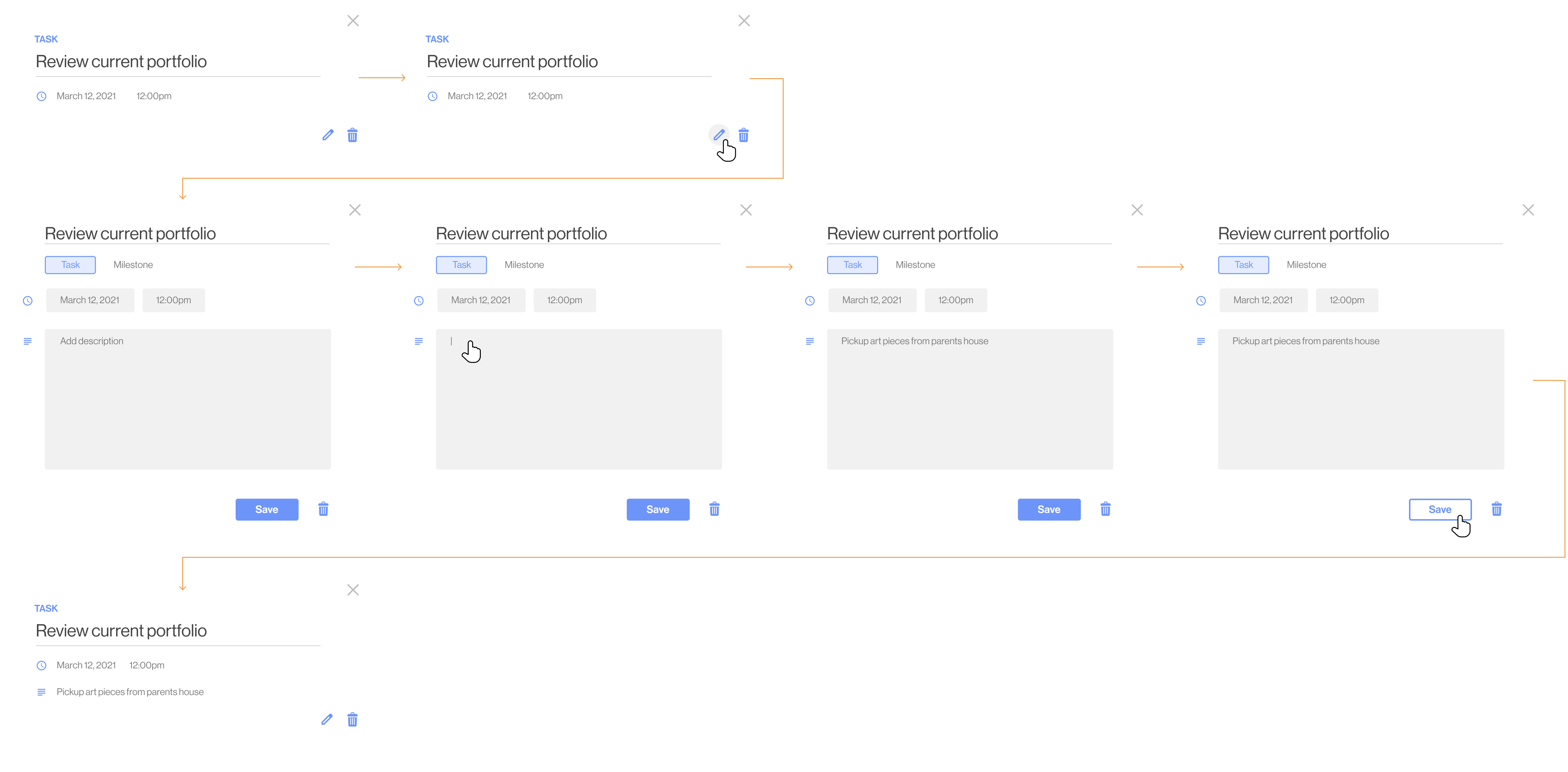
Task editing interactions and process
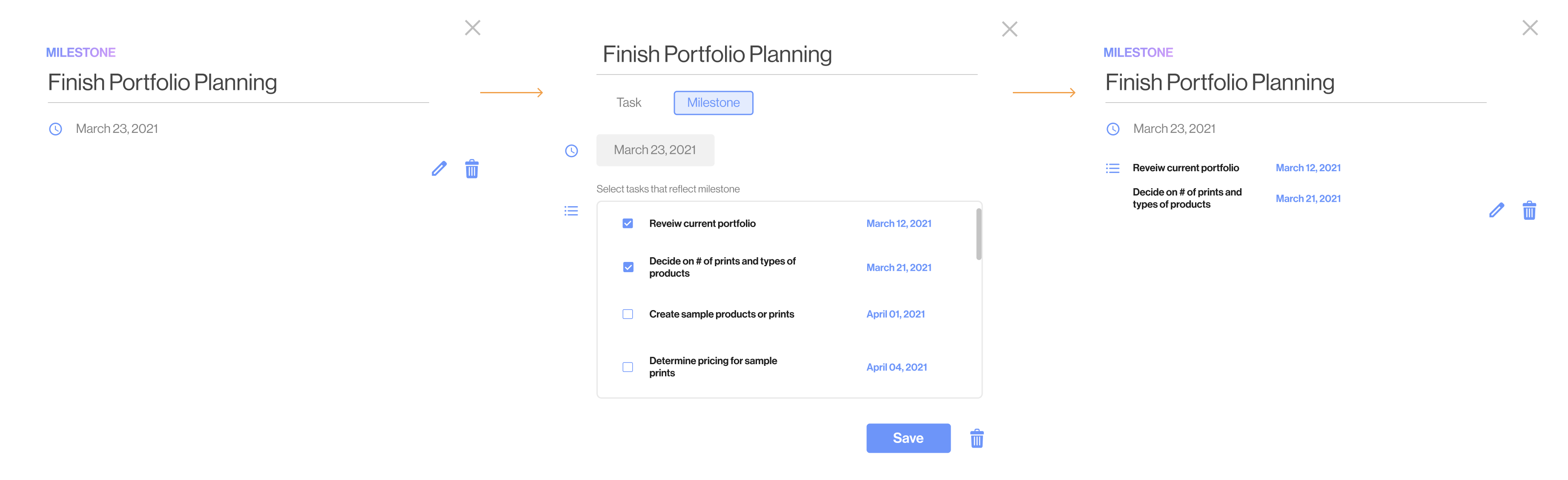
Milestone editing process

Milestone

Making changes to milestones are similiar to tasks, however you are given the option to select tasks that reflect when a milestone is achieved. This means that once the tasks of that milestone has been completed or all checked off, the milestone will be reached.

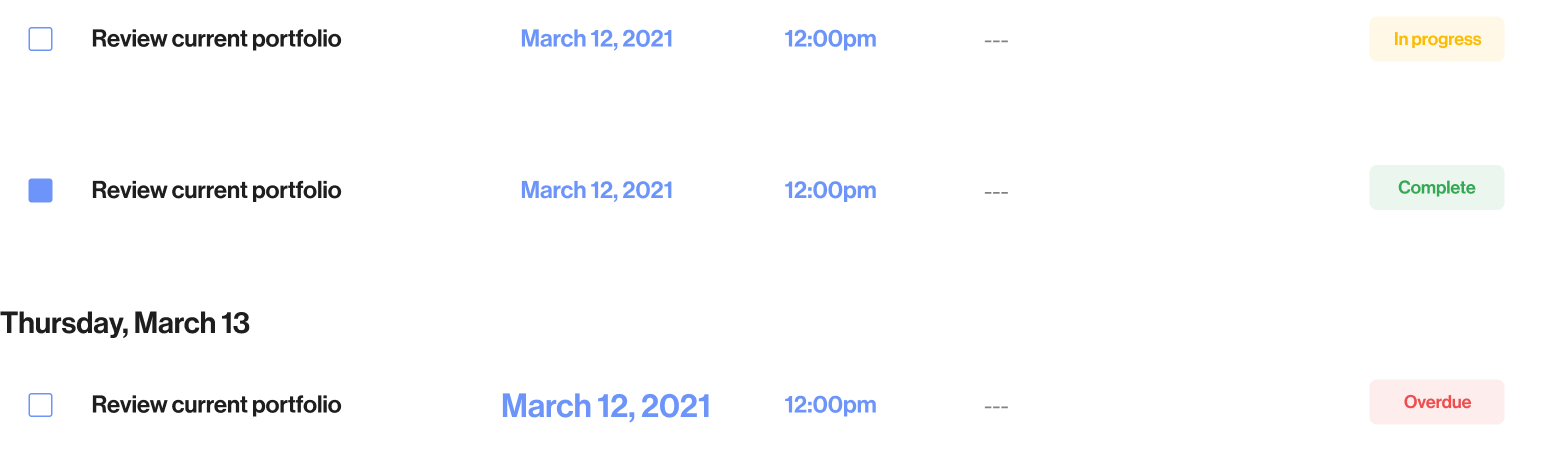
Task status

All tasks have 3 statuses: In progress, complete, or overdue.

In progress is the default status for any tasks that is not complete and has not exceed the due date. The Complete status is shown when users selects the radio button. Lastly the Overdue status appears when tasks are past the due date and time.

Resource and Message Page

These two features are where artists and organizers indirectly interact the most throughout the application.

On the resources page, Organizers can input resources including both MiniComi-specific internal resources such as learning how time management and budget, or external resources such as learning how to prepare your art for display.

On the Message page, Artists can directly communicate with Organizers, allowing organizers to provide an immediate casual response

Notification Settings

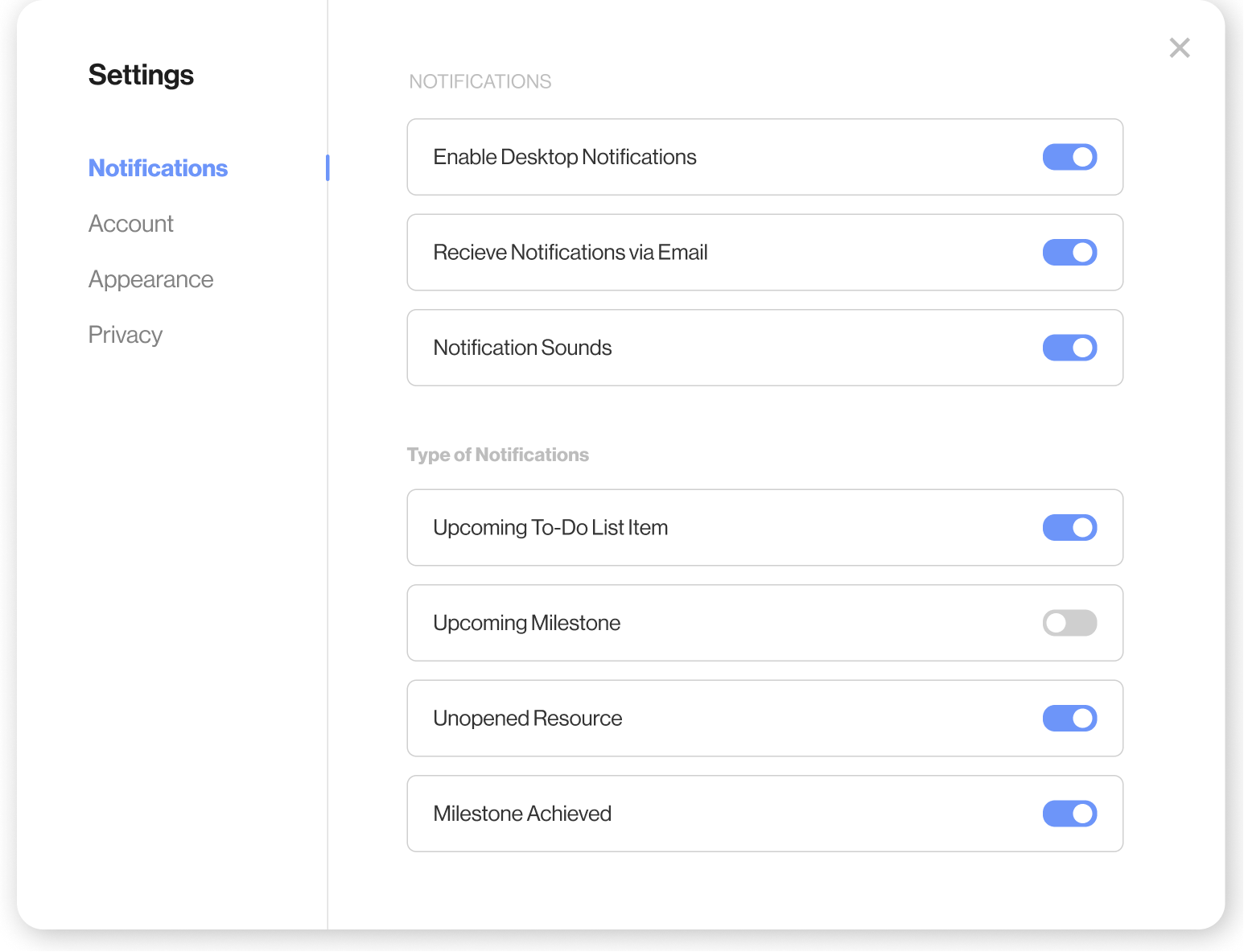
Prior to Minicomi, Matt is prompted with notifications to check his progress. To customize his notifications, Matt can edit and enable the notifications to his liking.

Having customized push notifications reduces efforts in the user journey by directing the user straight to the app. It also helps re-engage users from inactive to active while providing thoughtful reminders.

Cross-Platform Usability

User Persona of New Artist

MiniAgenda is a responsive application that can be accessed on different platforms. The web application allows better comfortability in viewing information-heavy pages and convenience in planning, while the mobile application provides immediate access to the application through push notifications and allows artists to track their task progress on the day of Minicomi.

Impact

The Artist

Improve the artist’s MiniComi experience by better informing and preparing them before the convention.

The app informs artists with recommended timelines, keeps them on track during the preparation phase, and provides them with important MiniComi resources.

The Organizers

Creates a foundation for a collaborative relationship between MiniComi organizers and artists.

The app gives the organizers a platform to easily release information and resources, stay connected with artists, and understand how to better assist artists during the planning phase.

Reflection

Redirection is normal

As this was my first time conducting multiple steps of user research and working with both the organizers and participants, it was not easy to prioritize a particular design problem to tackle. It was also frustrating when we would settle on a direction but then another problem would surface. How we ultimately solved this problem was focusing on organizer's top needs and values, as well as what participants want the most.

The power of individual strengths

In previous junior design classes, everyone had similiar skills and we tend to complete all design tasks together. However, for this project, everyone had been designing for a couple of years and understood their strengths and weaknesses. When we worked together, everyone had a particular role and their strengths to create an efficient and motivational work environment.